Shopping Cart







In Stock
Prestashop Modules and Scripts

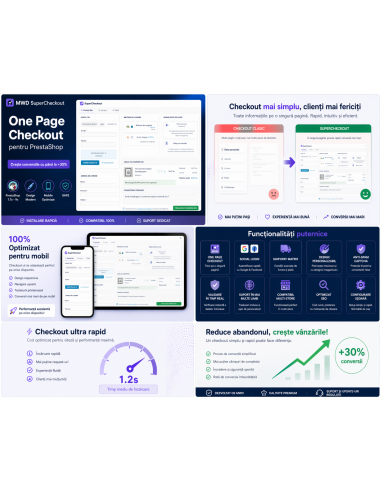
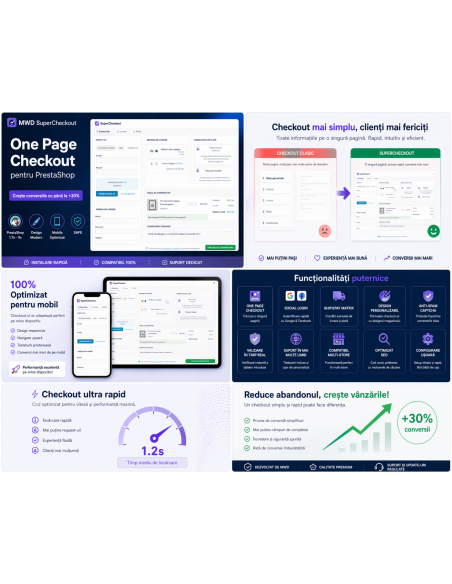
Transform your PrestaShop checkout into a fast, modern one-page experience that increases conversions and reduces cart abandonment
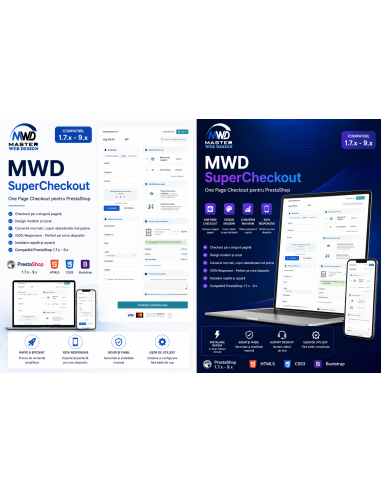
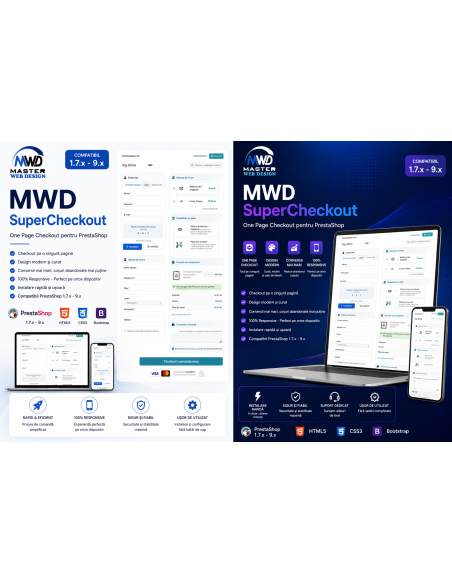
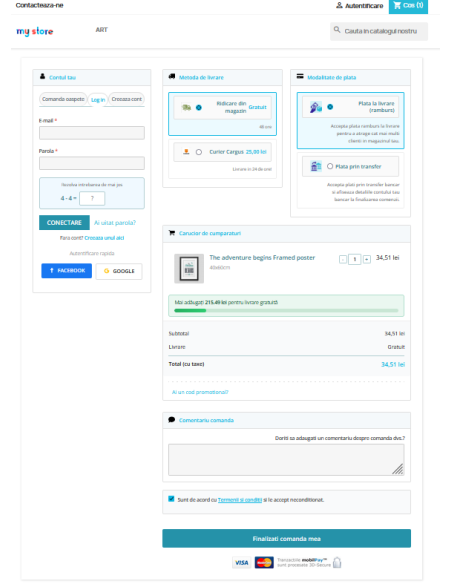
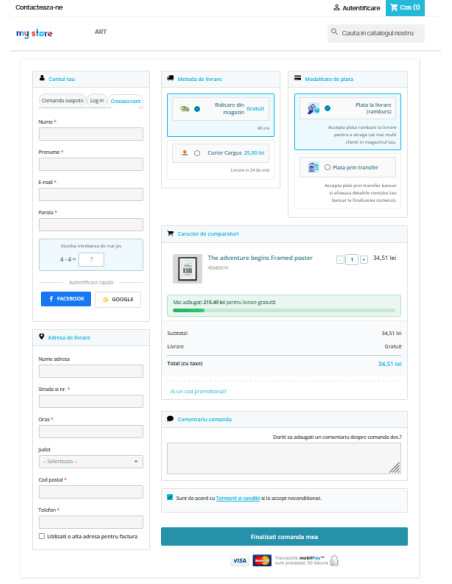
MWD Supercheckout is a professional one page checkout module for PrestaShop, designed to simplify the buying process, reduce friction, and help store owners increase completed orders.
Instead of sending customers through a long and fragmented checkout flow, the module brings the essential steps of the order process into a clear, fast, and user-friendly checkout experience.
The module is built for real online stores that need speed, clarity, flexibility, and strong control over how checkout information is displayed.
It allows merchants to manage customer account options, shipping and invoice address fields, delivery methods, payment methods, social login, anti-spam protection, checkout layout, colors, and advanced checkout behavior from a dedicated Back Office configuration panel.
MWD Supercheckout is a professional one page checkout module for PrestaShop, designed to simplify the buying process, reduce friction, and help store owners increase completed orders.
Instead of sending customers through a long and fragmented checkout flow, the module brings the essential steps of the order process into a clear, fast, and user-friendly checkout experience.
The module is built for real online stores that need speed, clarity, flexibility, and strong control over how checkout information is displayed.
It allows merchants to manage customer account options, shipping and invoice address fields, delivery methods, payment methods, social login, anti-spam protection, checkout layout, colors, and advanced checkout behavior from a dedicated Back Office configuration panel.
MWD Supercheckout is ideal for shops that want a modern checkout page, fewer abandoned carts, easier customer registration, better mobile usability, and a more professional buying experience.
Key Benefits
Reduce checkout friction
Customers can complete their order faster with a simplified one page checkout experience. By keeping account details, addresses, shipping, payment, cart summary, and order confirmation in one organized flow, the module helps remove unnecessary steps and improves the buying journey.
Improve conversion potential
A checkout process that is easier to understand and faster to complete can help reduce abandoned carts and encourage more customers to finish their purchases.
Offer a professional customer experience
MWD Supercheckout creates a cleaner and more intuitive checkout page, with configurable fields, messages, sections, colors, and layout options. Store owners can adapt the checkout experience to match their brand and selling process.
Control every important checkout area
The module gives administrators detailed control over account options, shipping address fields, invoice address fields, carriers, payment methods, social login, CAPTCHA, checkout comments, guest checkout, terms and conditions, and visual presentation.
Save time in store management
All major checkout settings are managed from a clear Back Office interface, making it easier to configure, adjust, and maintain the checkout process without editing code.
Main Features
One Page Checkout
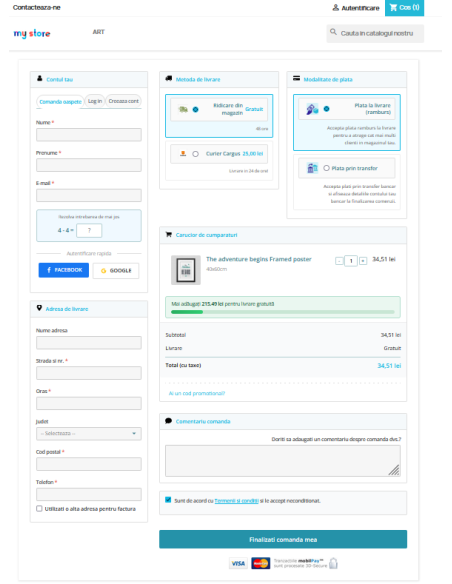
MWD Supercheckout replaces the standard multi-step checkout with a streamlined one page checkout flow. Customers can view and complete the key order steps in one place, including personal information, address details, delivery methods, payment methods, cart summary, order comment, and final confirmation.
The one page structure helps customers understand the full order process at a glance and reduces the feeling of a long or complicated checkout.
Custom Checkout Layout
The module includes layout options for the checkout page, allowing the store owner to choose how checkout sections are displayed. Depending on the store strategy and design preference, the checkout can be organized in a compact multi-column layout or a wider single-column structure.
This flexibility helps the checkout adapt better to different themes, screen sizes, and customer expectations.
Account and Customer Options
MWD Supercheckout supports different customer account flows, including guest checkout, account creation, and authentication. The merchant can define the default checkout tab and guide customers toward the most suitable option.
The module can also automatically turn registered guests into customer accounts, helping the store build a stronger customer base while keeping the checkout experience simple.
Configurable Account Fields
Administrators can control which account fields are displayed and which fields are required. This helps reduce unnecessary form inputs and keeps the checkout focused on the information the store truly needs.
The module supports common account-related fields such as email, password, social title, newsletter subscription, customer data privacy, and terms and conditions options.
Social Login with Facebook and Google
MWD Supercheckout includes social login support for Facebook and Google. Customers can sign in or create an account faster using their social accounts, reducing the time spent filling forms manually.
This feature is especially useful for stores that want to make checkout faster for returning users and easier for new visitors who prefer quick authentication.
Shipping Address Field Management
The module allows full control over shipping address fields. Store owners can choose which fields are visible and which are mandatory, such as first name, last name, address, city, country, state, postal code, phone, mobile phone, company, VAT number, identification number, address alias, and additional address information.
By adjusting these fields, the merchant can create a checkout form that is shorter, clearer, and adapted to local business requirements.
Invoice Address Field Management
MWD Supercheckout also includes a dedicated configuration area for invoice address fields. Merchants can decide which billing fields are displayed and required, independently from the shipping address configuration.
Customers can also use a different invoice address when needed, which is important for B2B orders, company purchases, and stores that require clear billing data.
Shipping Method Control
The module allows merchants to manage how available delivery methods are displayed in checkout. It supports carrier visibility, carrier order, delay information, and carrier logos.
Store owners can create a cleaner shipping selection experience by displaying only the relevant delivery methods and presenting them in a logical order.
Payment Method Control
MWD Supercheckout provides control over payment method display, status, order, and presentation. The module can show payment method icons and help customers identify payment options faster.
A clear payment section makes checkout more trustworthy and easier to complete, especially when stores offer multiple payment methods.
Ship2Pay Matrix
The built-in Ship2Pay functionality allows the merchant to connect shipping methods with compatible payment methods. This means the store can define which payment options are available for each carrier.
For example, cash on delivery can be enabled only for certain delivery methods, while bank transfer or other payment options can be displayed only when they make sense. This avoids customer confusion and prevents invalid carrier-payment combinations.
Order Summary and Cart Display
MWD Supercheckout includes an organized order summary area, helping customers review their products, quantities, shipping cost, totals, and final amount before placing the order.
A clear order summary builds trust and reduces last-minute hesitation, because the customer can verify all important information before confirming the purchase.
Order Comment Box
The module can display an order comment field during checkout. Customers can use it to add delivery instructions, special requests, or additional information related to their order.
This is useful for stores that sell customizable products, local delivery services, B2B products, or items that may require special handling.
Shipping Fee Notice
MWD Supercheckout can display a shipping fee notice to remind customers how much more they need to add to the cart to qualify for free shipping, when applicable.
This can encourage higher cart values while keeping the message clear and helpful inside the checkout page.
Guaranteed Safe Checkout Icons
The module allows merchants to display a “Guaranteed Safe Checkout” visual area or icons near the final checkout action. This helps improve trust and reassure customers before placing the order.
The store owner can upload or manage the safe checkout image to match the store’s branding and payment trust signals.
CAPTCHA Protection
MWD Supercheckout includes CAPTCHA options for checkout, login, and registration pages. The module supports math and alphanumeric CAPTCHA types and offers difficulty settings.
This helps reduce spam submissions, fake registrations, and unwanted automated activity without relying only on external services.
Test Mode with IP Restriction
The module includes a test mode that allows the custom checkout to be tested only for specific IP addresses. Other visitors can continue using the default checkout while the administrator configures or validates the new checkout experience.
This is very useful for safe deployment, testing, design adjustments, and client approvals before enabling the module publicly.
SEO-Friendly Checkout URL
MWD Supercheckout supports a friendly URL alias for the order page. Store owners can define a clearer checkout URL and align it with the store’s SEO and user experience preferences.
The module can update the relevant PrestaShop SEO and URL settings when saving the checkout alias.
Design and Color Customization
The module includes design customization options, allowing the merchant to adjust checkout colors for panels, headings, borders, buttons, links, hover states, discount areas, and other visual elements.
This makes it easier to match the checkout page with the store’s brand identity without custom development.
Mobile-Friendly Checkout Experience
MWD Supercheckout is designed to improve the checkout experience across devices. A simplified checkout flow, cleaner field organization, and configurable layout help customers complete orders more comfortably on mobile, tablet, and desktop.
For modern eCommerce stores, a strong mobile checkout experience is essential because many customers browse and purchase from smartphones.
Multilingual Support
The module includes translations for multiple languages, including English, Romanian, French, Spanish, Italian, and German. This makes it suitable for international shops or stores that operate in more than one language.
Back Office Dashboard and Configuration
MWD Supercheckout includes a dedicated Back Office area with multiple configuration tabs for settings, account, social login, shipping address, invoice address, delivery, payment, Ship2Pay, and design.
This organized structure makes the module easier to manage and helps administrators quickly find the settings they need.
No Core Editing Required
The module is designed as a professional PrestaShop checkout solution that can be managed from the Back Office. Store owners can configure the checkout behavior and appearance without manually editing core files.
Why Choose MWD Supercheckout?
MWD Supercheckout is more than a simple visual checkout redesign. It is a complete checkout management solution built for PrestaShop stores that need practical control, a better user experience, and a smoother order process.
It combines one page checkout, social login, configurable fields, shipping and payment control, Ship2Pay logic, CAPTCHA protection, design customization, mobile usability, and trust-building elements in one module.
For merchants, it means more control and a cleaner workflow. For customers, it means a faster and more intuitive checkout. For agencies and developers, it means a flexible module that can be adapted to different store requirements and client projects.
Perfect For
Online stores that want to reduce abandoned carts
Stores that need a faster checkout experience
Merchants who want to simplify the customer journey
Shops with multiple shipping and payment methods
Stores that need carrier-payment restrictions
PrestaShop shops that require guest checkout and account creation options
Agencies building professional eCommerce projects
Multilingual shops selling in different markets
Stores that want a checkout page aligned with their brand
Feature Summary
One page checkout for PrestaShop
Configurable checkout layout
Guest checkout support
Account creation and login options
Default checkout tab selection
Facebook login
Google login
Configurable account fields
Shipping address field control
Invoice address field control
Different invoice address option
Shipping method display control
Carrier order and status management
Payment method display control
Payment icons
Ship2Pay carrier-payment matrix
Order summary
Order comment box
Terms and conditions option
Newsletter subscription options
Partner offers option
Shipping fee notice
Safe checkout icons
CAPTCHA protection
Math CAPTCHA
Alphanumeric CAPTCHA
CAPTCHA difficulty settings
Test mode
IP-based checkout testing
Friendly checkout URL alias
Design and color customization
Mobile-friendly checkout experience
Multilingual translations
Back Office configuration panel
Compatible with PrestaShop 1.7.x – 9.x
Conclusion
MWD Supercheckout helps PrestaShop store owners create a faster, clearer, and more professional checkout experience.
By reducing unnecessary steps and giving administrators full control over checkout content, fields, shipping, payment, design, and security, the module helps transform the checkout page into a stronger conversion point.
It is a practical solution for merchants who want to improve customer experience, reduce checkout complexity, and manage the final step of the purchase process with confidence.